Solution for Windows 2000, Windows XP and Windiws Server 2003.

Messenger service sends network messages to or receives network messages from users and computers, administrators, and also alerter service.
This service is not a part of Windows Messenger and not compatible with it (you can't send the messages from Windows Messenger to Messenger Service and vice versa).
If you disable Messenger service, you won't be able to receive notifications that are sent to you, net send command and net name command will not work either.
However, enabled Messenger service may cause spam messages if your office (home) firewall is not configured correctly to block messenger service ports except in your local network.
If you have any difficulties with this instructions, you can download our free utility - Messenger Control Tool to disable or enable Messenger Service with one click.
As a first step, you should open Run box to open Services panel after that.
1. Click on the Start button in the left bottom corner of your desktop.
2. Click on the Run item in the Start menu, Run box will appear.
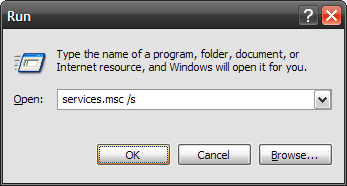
3. Now type in the Run box: services.msc /s and hit OK, Services Panel will appear.

4. Find the text line starting with Messenger and double-click on it to open service properties.

Now you can disable or enable messenger service. To disable it, stop the service by clicking Stop button and set the Startup type to Disabled. Next click on Apply button and close all these windows.
If you want to enable it, set the Startup type to Automatic, start the service by clicking Start button, click on Apply button and close all these windows.