Talk it up with LanTalk XP
by Guy Lerner
October 21, 2002
There's a little known secret buried deep in your Windows code that allows you - and your networked colleagues - to chat to each other using nothing but your PCs and a few command-line clicks.
Messaging 101
Veteran Windows users need not apply: You already know the secrets of Windows Messaging, and have probably been using the command-line interface to text your work colleagues with lame jokes and arb anecdotes for years. Those of you that subscribe to one of the major ISPs, like AOL, have probably been using other means of communicating through instant messaging, which for the uninformed is an e-mail-like utility that lets you send and receive real-time messages from one or more people connected to the Internet.
But instant messaging is not restricted to Internet users. Any number of people sharing a Windows network should be able to send and receive messages to other users with the Windows Messaging protocol. Try it: At the command prompt, type: net send machinename message, where "machinename" is a user or computer name (e.g. GuyL) on the network, and "message" is your message. If nothing happens, you probably don't have the WinPopUp progam (Windows 95/98/Me) or Messaging service (Windows 2000/XP) running - the same program/service responsible for sending you messages about your operating system, like the pop-up messages that appear when a print job is done, or an application error is encountered, for example.
What has been missing is a utility that makes instant messaging for non-Internet users as useful as some of the third-party messaging tools provides by AOL and Microsoft, among others; tools that make instant messaging as useful as e-mail. I think you'll agree that sending cryptic text messages using the command line is not everybody's idea of intuitive, Windows-age communications!
Enter LanTalk XP from CEZEO Software, recently updated in version 2.7.1.0. LanTalk uses the Windows Messaging protocol to provide networked users with a neat interface for sending and receiving instant messages. It also adds powerful features that extend the usefulness of the bare-bones Messaging service, such as a messages scheduler (to send messages at a specified time), an e-mail sending tool, message printing, message exporting and support for multiple languages, among others.
Most importantly, LanTalk XP doesn't need the Internet. This may seem like a trivial technicality, but in practice it means office workers and home networkers have the same Internet-like features available to them without the expense (or delay) of an Internet connection. It also means one less complication when all you want to do is send someone a message, especially someone using the same network you're on.
Strictly business
LanTalk XP is a business tool. It doesn't make any bones about it, and doesn't pretend to be anything otherwise. Messages are kept small (maximum 32K - try sending an e-mail that size!) and file transfers are disabled, so you won't find employees using your Windows resources to swap mp3 files and girlie pics on company time.
Click to see more screenshots
While this sounds restrictive, consider its purpose: Business communication. Take a typical small to medium company with 100 employees; chances are quite a few of them will be talking to each other at the same time, using the internal phone system or e-mail. Neither is an ideal medium for quick communication; both are time consuming, costly and eat up valuable resources. Instant messaging, on the other hand, allows the same employees to send and receive messages from their colleagues without the resource overhead.
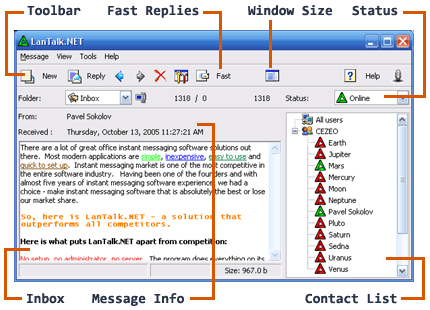
What LanTalk XP adds to this picture is the features that make instant messaging a valuable business communications tool. For starters, the interface is clean and easy to use; even a novice Windows user will figure it out in about three minutes flat, so there's no training involved. It then adds Windows nice-to-haves, like multiple windows for multiple messages, and the ability to store received messages (ala e-mail). It allows you to sort people on the network into groups, so you can flag several people at once, and to send messages at a certain time (useful when your colleagues in Australia only wake up when you're long asleep).
Best of all, we know it's a business tool because companies like LG are using it, as is the US government (or so I'm told). That's sure to make it a hit in the name-dropping, reputation-savvy business community. After all, if Joe Green is using it, heck so should I!
The bottom line
Using LanTalk is so simple, I'm not going to take up much of your time trying to explain it. Select the "white page" icon in the top-left corner, type in your message, pick a user from the panel on the right, and hit "send". If all goes to plan, the person/s you just messaged will have a pop-up screen on their PCs with your message displayed. If they're also using LanTalk, they'll be able to reply to your message by hitting - wait for it - "reply", and going through the same steps above. If they don't have Lantalk installed, they can still reply from the command-line, and you'll get their reply neatly formatted in LanTalk.
If you care to dig deeper into the program (and by all means do), there are dozens of options you can set for everything from the way the program behaves (Options --> System settings), the way the program looks, complete with customized skins (Options --> Interface settings), the way your messages appear (Options --> Message settings), the way your messages are filtered (Options --> Filter settings) and even your link to the e-mail world (Options --> SMTP settings). The last feature actually connects LanTalk to your e-mail backbone, so you can use it to send messages to an e-mail address in case the recipient can't use Windows Messaging.
LanTalk XP will set you back about $14.95 for a single license. If that's too steep on this evidence, download it free for 30 days and try it yourself. I think you'll find that communicating at work has just become considerably easier, faster and, er, neater.
Conclusion
LanTalk XP is a useful utility that will add value to any business or home network by making Windows Messaging more accessible and infinitely better looking. Windows XP users will especially appreciate the colourful, customizable interface, and other Windows users will benefit from the XP look on their desktops. It may be a bit presumptuous to think business users will never send legitimate file attachments, and adding this feature will make LanTalk XP, in my book, a serious e-mail alternative. Until then, I give LanTalk XP four out of five Go Inside Review Lights.