Simple IM App For Windows - LanTalk NET Requires No Setup Or Server
by Processor.com
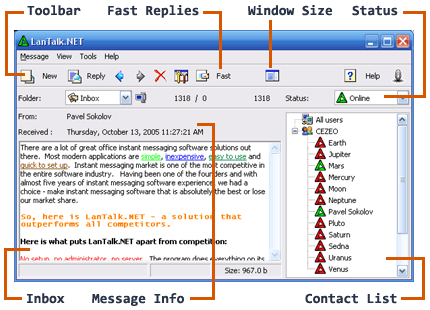
Click to see more screenshots
September 15, 2006
While instant messaging is part of everyday life for millions of computer users, it has become both the savior and bane of many businesses. Instant messaging lets workers share information immediately, but it can also be disruptive when employees spend work time communicating with friends outside the office. It can be even more disruptive when internal sensitive information is passed, either accidentally or by stealth, to the wrong recipient.
Many organizations have strict policies against IM systems precisely for these reasons. Unfortunately, they also lose out on the benefits IM can deliver to work teams. One solution is to provide IM systems that can only be used within the confines of the enterprise and don’t connect to the wider world of the Internet.
Cezeo’s LanTalk NET 3.1 is one such application because it is designed to work inside a company’s firewall. Even so, an administrator can configure it to allow connection to users beyond the corporate walls if necessary. LanTalk NET delivers security partly because it uses a proprietary client that isn’t compatible with the hosted IM services such as Yahoo! and AOL. In fact, the LanTalk NET doesn’t rely on a server at all and is strictly a peer-to-peer service.
The installation process automatically assigns the current Windows username as the IM ID, making setup fast and easy. Once launched, the program shows a list of currently connected users.
LanTalk NET is similar in many ways to email. Rather than sending a message to a single user at a time, the user selects recipients from the list of both online and offline accounts. Messages sent to offline users are held for delivery when the user logs in. Also like email, it’s easy to attach files and use the WYSIWYG editor to create messages.
According to Pavel Sokolov of Cezeo Software, “Our customers like LanTalk NET because it’s an easy-to-use and feature-rich instant messenger. The most frequent use for LanTalk is for interoffice communications, sometimes within a single office building but sometimes between offices in different cities.” LanTalk works well across WANs, according to Cezeo.
“LanTalk NET is also popular in the educational environment because it doesn’t require a server and the associated administration,” says Sokolov.