Communicate with others on a network
by ZDNet International , ZDNet.com
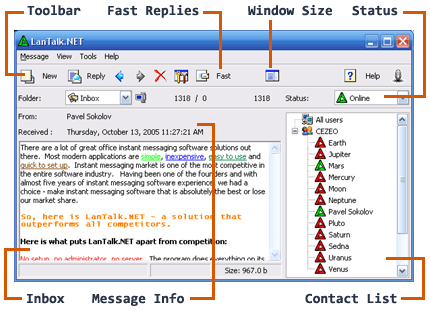
Click to see more screenshots
03-22-01
LanTalk Pro is designed as a full-featured, robust replacement for Winpopup. It's simple to use and requires virtually no setup.
The program sits in the system tray until a message arrives and can even be activated by a hotkey. A windowed display allows users to type messages in an editor box, while the auto-reply, ignore, and fast-reply (send predefined messages with the click of a button) features can save a great deal of time.
LanTalk Pro also has a dual-window screen, allowing users to view incoming messages as they write new ones. It has a find function to search through received messages for any text. The user-friendly interface has many options including using skins to let users choose themes that customize the look and feel or even to change and design their own icons and buttons.